
In businesses, data is one of the most important assets for daily operations, decision-making, and regulatory compliance. Databases, applications, financial systems, and customer service platforms all rely on information being available, up-to-date, and protected at all times.
To achieve this, many companies implement a key strategy: data replication. In this article, we’ll explain what it is, how it works, its types, business benefits, use cases, and best practices for implementation.
What is Data Replication?
Data replication is a process that allows information to be copied and kept synchronized across multiple locations, ensuring there are several versions of the same data set. This helps reduce the risk of data loss, improve system availability, and ensure operational continuity in the event of failures or disruptions.
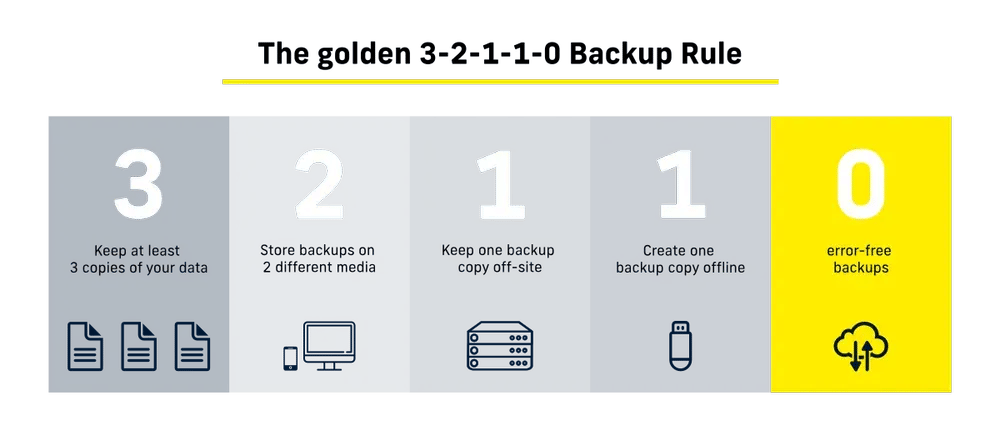
In practice, data replication involves copying information from a primary system to one or more additional locations, following best practices like the 3-2-1-1-0 backup rule. These copies can be stored on external drives, network storage systems, or cloud platforms.
The goal is simple: not to rely on a single copy of the data. By distributing information across different locations, the company gains redundancy, which translates into greater reliability and faster recovery in case of failures, errors, or unexpected incidents.
Today, this process no longer needs to be manual or complex. Tools like TecnetProtect make it possible to automate replication, keep copies constantly updated, and ensure data remains consistent across all destinations. This reduces the margin of error, saves time for the IT team, and ensures that information is available when it’s truly needed.
How Does Data Replication Work?
The way replication works depends on the type of technology and the company's architecture, but in general, it follows these steps:
-
Data is generated or modified in the primary system.
-
The replication system detects those changes.
-
The changes are transferred to one or more destinations.
-
The replicas are updated to stay consistent with the source.
This process can be carried out in different ways depending on the company’s needs, the volume of data, and the required level of availability.
Benefits of Data Replication for Businesses
When a company implements a solid data replication strategy, the benefits become evident quickly. At TecnetOne, we see every day how this approach helps organizations operate with greater peace of mind, reduce risks, and keep their systems running without unnecessary interruptions.
High Availability of Information
Replication ensures that data remains available even if the primary system fails. This reduces the impact of outages and prevents prolonged service downtime.
Operational Continuity
With updated copies in different locations, the company can continue operating in the face of technical failures, human errors, cyberattacks, or unexpected incidents, minimizing financial and operational losses.
Improved System Performance
Distributing data across multiple replicas helps balance the workload, especially in environments with many simultaneous queries. This results in faster response times and a better experience for both internal and external users.
Scalability
Replication makes it easier for businesses to grow, allowing them to add new systems or locations without having to completely redesign their data infrastructure.
Regulatory Compliance
Many regulations require information to be available, protected, and stored redundantly. Replication helps meet these requirements and ensures that information is accessible during audits or incidents.
Read more: The Hidden Cost of Downtime and How Backup + DR Save You
Types of Data Replication
- Synchronous Replication: In synchronous replication, every change made to the primary system is immediately copied to the replicas before the operation is confirmed. This ensures total consistency across all copies, as they all contain exactly the same data. This method is ideal for critical systems where data loss is unacceptable, though it may introduce higher latency and requires a robust network infrastructure.
- Asynchronous Replication: In this approach, data is replicated after it has been recorded in the primary system. There is a slight delay between the source and the copies, but it offers greater efficiency and flexibility, especially when replicas are in different geographic locations. Many companies choose this model as it balances availability, performance, and cost.
- Snapshot Replication: This involves creating a complete copy of the data at a specific point in time and replicating it to other locations. This method is especially useful for system recovery, as it allows reverting to a clean version of the data in case of failures or ransomware attacks.
Most Common Industry Use Cases
- Financial Systems: Companies in the financial sector use replication to ensure that transactions are accurately recorded and systems continue operating even during failures.
- E-commerce: Replication ensures the consistency of inventory, orders, and customer data—even during high-demand peaks.
- Healthcare and Professional Services: It enables data to be available across different branches or areas of the organization without compromising data integrity.
- Distributed Infrastructure: Companies with operations in multiple regions use replication to bring data closer to users and maintain business continuity.
Best Practices for Implementing Data Replication
Define Clear Objectives
Before implementing replication, it’s crucial to determine which systems are critical, what level of consistency is required, and what the impact of a disruption would be.
Constant Monitoring
Replication should be monitored to detect delays, errors, or inconsistencies before they affect operations.
Optimize Resource Usage
Replication consumes bandwidth and storage. It’s important to properly size the infrastructure to avoid bottlenecks.
Test Recovery Scenarios
It’s not enough to replicate data; failover and recovery processes must be tested regularly to ensure they’ll work when needed.
Apply Security Controls
Replicated copies should be protected by the same security policies as the primary system, including encryption and access control.
Read more: Real-Time vs. Scheduled Backup: Differences and When to Use Them
Risks of Data Replication
While data replication offers many benefits, it also comes with certain challenges that should be carefully considered. As IT environments grow and servers are distributed across various locations, complexity increases—and with it, risks that must be properly managed.
- Data Inconsistencies: One of the main challenges is keeping information aligned across all copies. Delays in replication, network issues, or simultaneous updates can lead to differences between replicas, such as incomplete data, unexpected formatting changes, or record errors.
- Potential Data Loss: Although replication is often part of a data protection strategy, it doesn’t always guarantee real-time coverage. If a failure occurs before changes are replicated, there is a risk of losing recent information.
- Latency and Performance: Replicating data over a network consumes bandwidth and can introduce latency. When the connection is unstable or has limited capacity, updates may be delayed, affecting the availability of up-to-date data.
- Security Risks: Copying data to multiple locations increases the exposure surface. That’s why it’s essential to protect data both during transfer and while stored, using proper encryption and access control.
- Regulatory Compliance: In regulated industries, data replication must comply with specific regulations and data protection laws. Meeting these requirements can add complexity, especially when data is replicated across different regions.
Managing Data Replication
Implementing data replication is only part of the process. To truly add value to the business, it must be managed properly—with visibility, control, and automation. Without effective management, replication can become complex, difficult to monitor, and prone to errors.
This is where solutions like TecnetProtect play a key role. This solution allows companies to centralize the management of data replication, automate processes, and ensure that copies remain updated and protected at all times. From a single platform, IT teams can monitor the status of replicas, detect issues, validate data consistency, and respond quickly to any problems.
Moreover, TecnetProtect makes it easier to integrate replication into a broader data protection strategy, combining it with backup, disaster recovery, and security controls. This reduces operational workload, minimizes manual errors, and enables businesses to focus on their core operations, knowing their critical information is well-managed.