Ask your IT team how many critical vulnerabilities the company has right now, and the answer will probably start with "let me check." That margin of uncertainty is exactly what attackers take advantage of: they do not need to find a new vulnerability when a publicly known one that nobody closed in time will do.
The TecnetSOC Vulnerabilities module exists to close that gap. It identifies every CVE (a publicly catalogued security flaw) in your infrastructure, assigns its severity using the CVSS standard, flags which ones are past their remediation deadline and gives you the exact command to fix them, so nobody has to cross-reference reports by hand.
Vulnerabilities themselves are unavoidable in any software stack. The underlying problem is not knowing which ones truly matter, which machines they are on and what to do about them today.
Having vulnerabilities is not the problem; not knowing which to fix first is
No infrastructure is free of CVEs. Every operating system, every library and every third-party application builds up known vulnerabilities over time, and that holds true for every company without exception.
The real trouble starts when those vulnerabilities are discovered but nobody prioritizes them: an IT team that receives a list of a hundred CVEs with no severity or deadline ends up fixing none of them in time, because it does not know where to start.
Without clear severity criteria and without visibility into how overdue each vulnerability is, remediation turns reactive: teams fix whatever caused an incident, while the issue most likely to cause the next one waits. The Vulnerabilities module turns that flat list into an ordered work queue, with the most severe and most urgent items at the top.
How the TecnetSOC Vulnerabilities module works
1. The big picture in four numbers
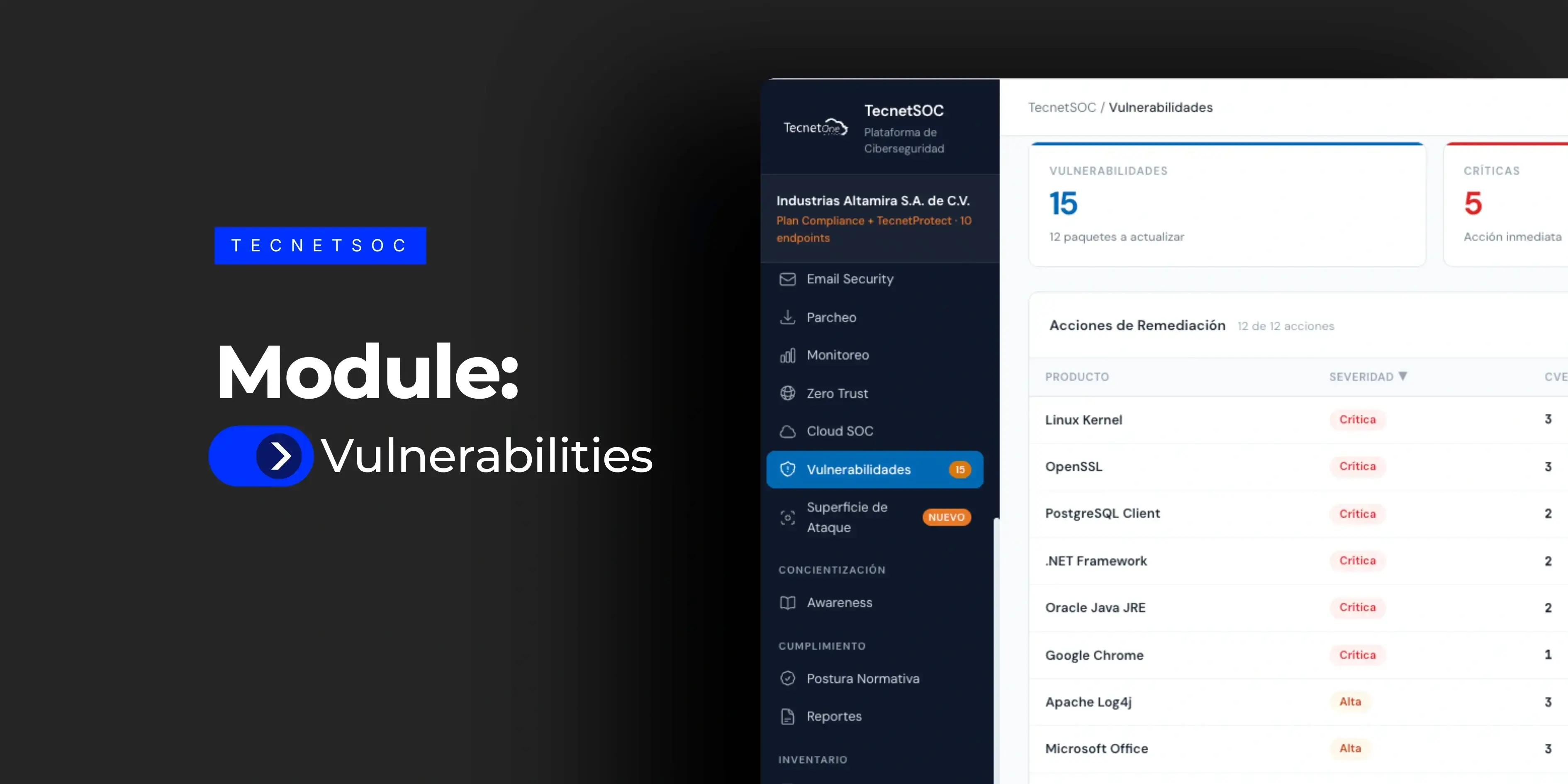
When you open the module, the portal immediately shows the total number of vulnerabilities detected, how many are critical, how many are high severity and how many devices are at risk because they have at least one critical or high vulnerability. Every critical vulnerability is labeled as requiring immediate action, and every high one carries the recommended remediation window (under 7 days), so priority never depends on someone's interpretation.
2. Remediation actions grouped by product
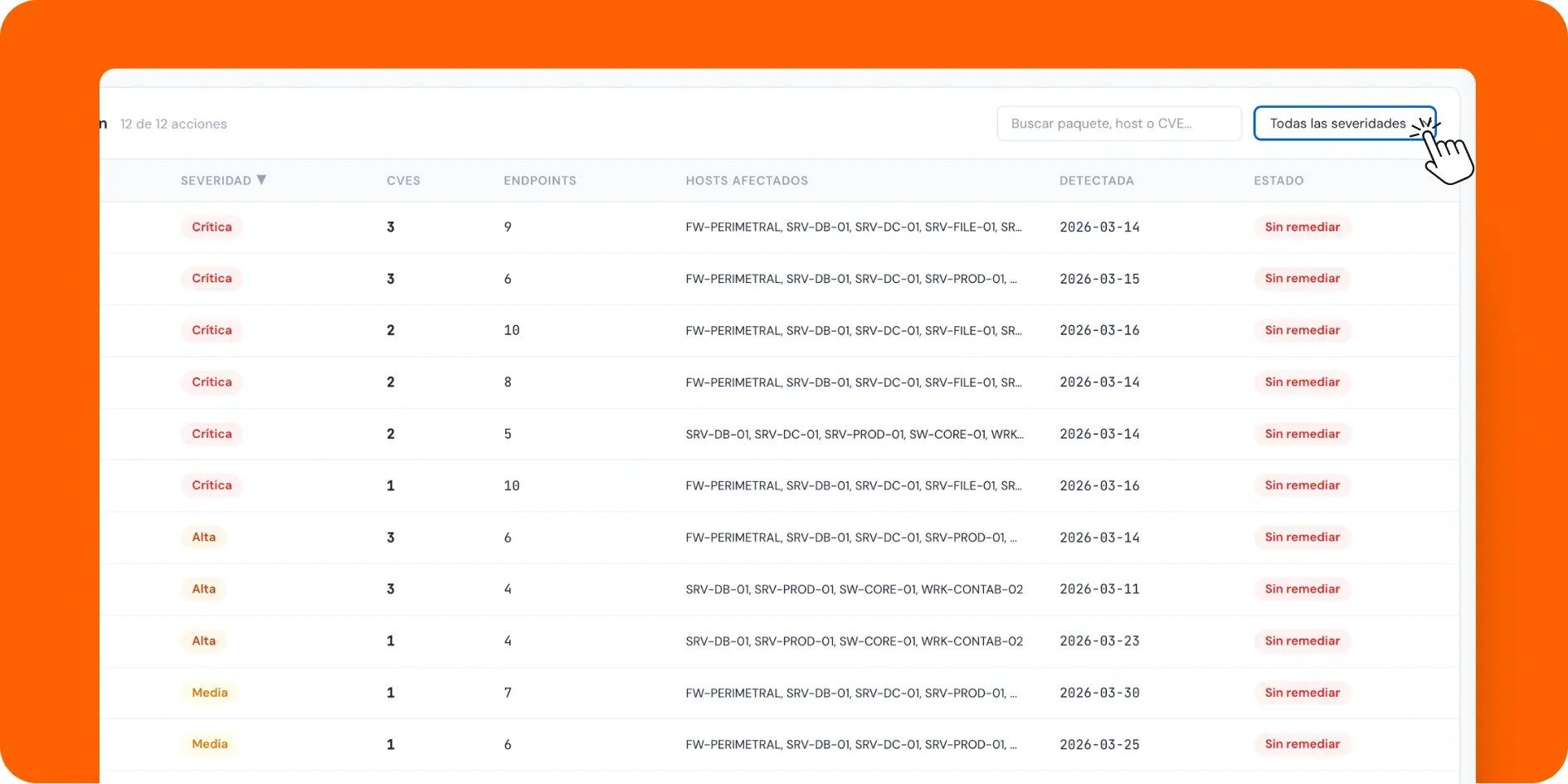
Instead of a list of loose CVEs, the module groups vulnerabilities by the product or package that contains them: Linux Kernel, OpenSSL, PostgreSQL Client, .NET Framework, Oracle Java JRE, Google Chrome and others. Each row shows the package severity, how many distinct CVEs are associated with it, how many endpoints it is present on, which specific hosts are affected, when it was detected and whether it is still unremediated.
This grouping prevents the classic mistake of treating each CVE as an isolated case: if one outdated package has three critical vulnerabilities, IT needs a single update to close all three, which saves three separate tickets.
3. Severity filter and search
The table can be filtered by severity (critical, high, medium, low) and searched by package, host or specific CVE. For a quick review before a meeting with leadership, filtering to critical only narrows the view to what really demands action that week, without reading all fifteen rows.
4. Detail panel with the exact remediation
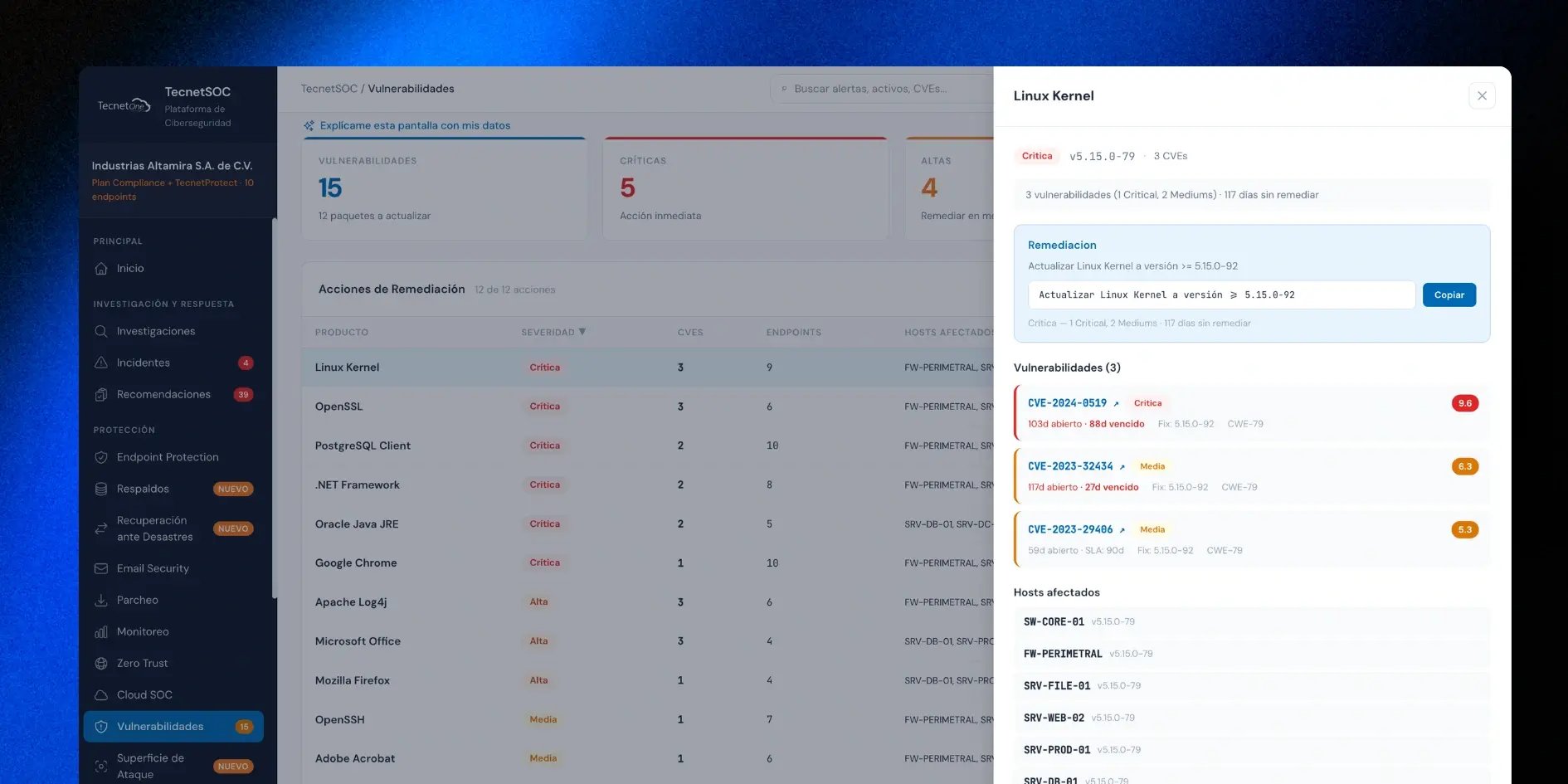
Click any product and the side panel shows the currently installed version, how many CVEs it has and the full detail of each one: CVE identifier, severity, CVSS score, how many days the vulnerability has been open, how many days it is overdue according to its remediation SLA (service level agreement) and the version in which it is already fixed.
A remediation block at the top provides the exact command to update the package to the safe version, with a button to copy it directly. Below it sits the full list of affected hosts with the version each one is running.
This panel answers, with no ambiguity, the question an IT director asks after an alert: what exactly do I need to run, and on which machines?
5. Guided explanation from the portal assistant
The "Explain this screen with my data" button connects to the TecnetSOC AI assistant, which explains in plain language, using only that account's real data, what the numbers in the Vulnerabilities module mean and what is worth addressing first. The portal itself notes that this explanation is no guarantee; it is a supporting read on the current state of monitoring.
How it connects with the rest of TecnetSOC
The Vulnerabilities module receives the CVEs tied to the software detected in the Software module directly: when an application in that inventory has a known vulnerability, the link brings you here to see its full severity and remediation.
It also shares the same set of devices as the Assets module, so every affected host that appears in a vulnerability panel is the same asset that already has its own history and protection posture documented.
And it complements the Endpoint Protection module: while Endpoint Protection stops active threats in the moment, the Vulnerabilities module closes the door before anyone can use it.
Without this cross-referencing, each vulnerability stays an isolated alert. The Vulnerabilities module is what turns it into a concrete action with an owner and a deadline.
Applying the recommended patches within your remediation SLA is a shared responsibility: TecnetSOC prioritizes and notifies, and your team applies them.
When a vulnerability cannot be remediated, for example on a system that does not support the patch, you have the option to formally accept that risk instead of leaving it flagged as overdue with no resolution. The module does not run penetration tests and does not update packages automatically without your approval.
What changes when severity stops being a matter of opinion
At most companies, deciding which vulnerability gets patched first depends on who complains the loudest that week: the department that had a scare, the vendor that keeps insisting or simply the latest email. That informal approach is what lets a critical vulnerability with a public exploit stay open for months while lower-risk items get attention.
With severity calculated by CVSS and overdue deadlines visible to everyone, that discussion no longer rests on opinions. The IT team can show anyone, using the same criteria as the rest of the industry, why one vulnerability was handled before another.
And when someone asks why a certain system took a while to patch, the answer stops being "it slipped through" and becomes the exact record of when it was detected, how severe it was and how long it took to resolve.
That is what separates a team that reacts to incidents from one that actively manages its exposure. Zero vulnerabilities is impossible; what matters is being able to prove at any moment that the most dangerous ones were closed first.
Checklist: five questions about your vulnerabilities
- You know how many critical vulnerabilities you have open right now, without asking anyone for the number.
- You can tell which ones are past their remediation deadline and how many days overdue they are.
- You know exactly which command to run to close each vulnerability, without looking it up yourself.
- You can see in seconds which specific machines each CVE is present on.
- You can show, with dates, how long your company takes to remediate a critical vulnerability.
This visibility is built into TecnetSOC, alongside software inventory, asset management and the rest of its modules.
How to get started with the Vulnerabilities module
If you are already a TecnetSOC customer, the Vulnerabilities module is available in your portal: there you can check your open CVEs, filter by severity and get the remediation command for each affected package.
If you are not a customer yet, here is the question worth asking: if someone asked you right now for the list of unremediated critical vulnerabilities at your company, would you have the answer in minutes, or would it take days to put together? If you are not happy with the answer, book a meeting with one of our specialists to review the real state of your vulnerabilities.

Microsoft Cloud and Cybersecurity expert with more than a decade of experience in the technology industry. He is recognized for his extensive knowledge in implementing cloud-based solutions and protecting data and systems against cyber threats. As a leader and speaker, Gustavo continues to share his knowledge and best practices at technology events and training programs.