Do you know what percentage of your computers have the security updates they should already have? Most IT directors can't answer that question with a number. It isn't that they don't care; nobody manually checks every server and workstation to confirm it.
The Patching capability lives inside the TecnetSOC Protection module, and it was built for exactly that: it measures compliance per device, prioritizes what is pending by severity and documents every patch already applied, all under an SLA (service level agreement) defined in advance.
The underlying problem is that an unpatched computer looks just like an updated one. It stays on, keeps working and keeps processing whatever it is supposed to. The gap only shows up when someone exploits the vulnerability that patch would have closed, and by then it is an incident instead of a maintenance task.
The hard part of patching is knowing what is missing and for how long
No mid-size or large company applies one hundred percent of its patches the day they are released. That isn't realistic, and it isn't always the priority. The real issue is different: without a compliance figure and an SLA by severity, there is no way to tell a routine patch that can wait from a critical one that has been exposed for weeks.
Without centralized visibility, the only way to know what is missing is to check machine by machine, something no IT team can keep up consistently. As a result, critical patches (the ones that fix actively exploited or zero-day vulnerabilities) end up in the same list as minor updates, and nobody can tell which one has been outside its remediation window the longest.
The Patching module turns that open question into a number you can verify: how many endpoints are up to date, what they are missing, how urgent it is and what has already been applied.
How the TecnetSOC Patching module works
1. The overall status in four figures
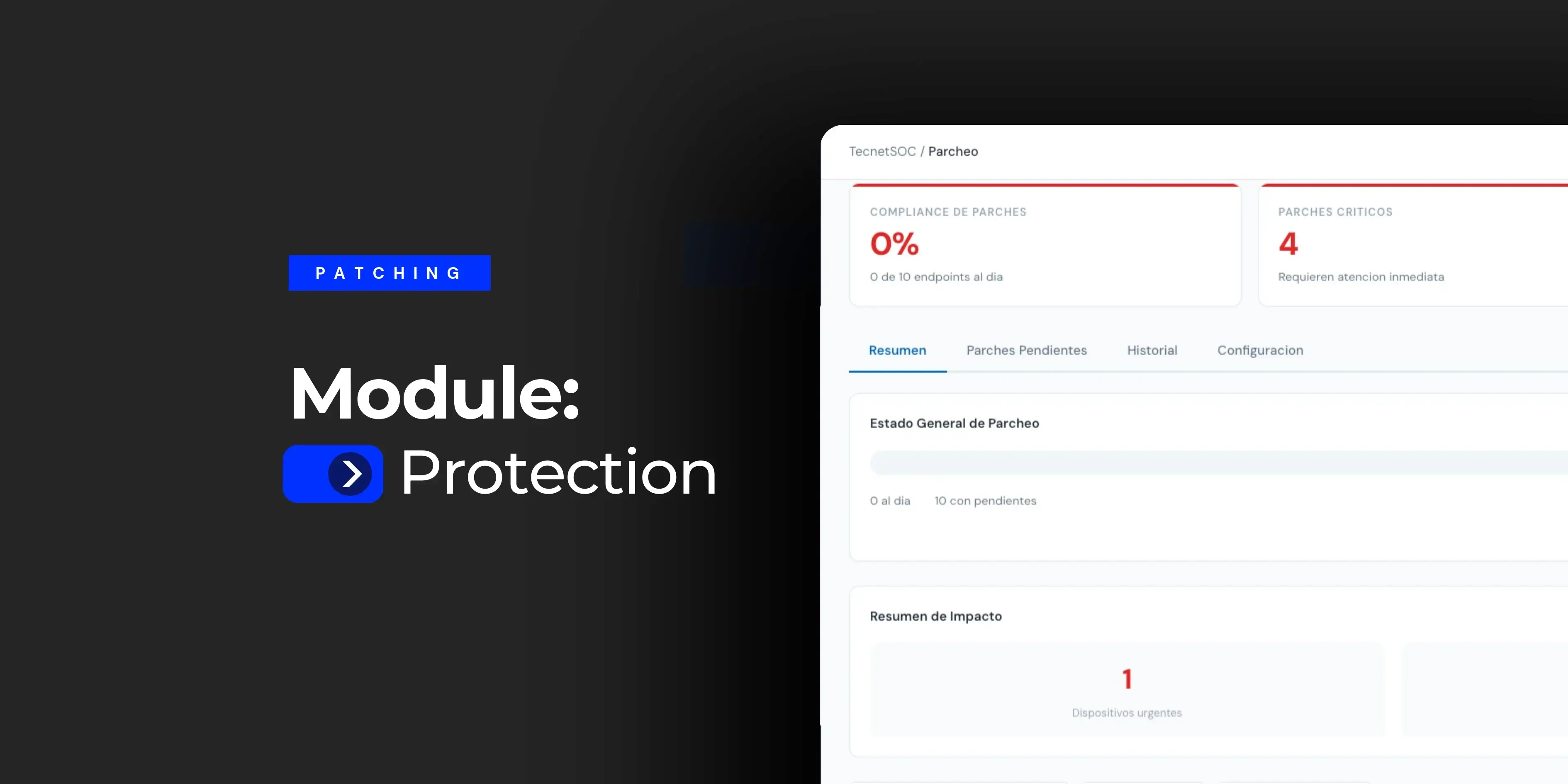
When you open the module, the portal immediately shows patch compliance (the percentage of your endpoints that are up to date), the critical patches that need immediate attention, the total number of pending patches broken down by priority (critical, important and routine) and the number of devices under active management.
In an environment that was just brought under monitoring, with accumulated technical debt, compliance may start at 0%, a real starting point before the patching process gets going.
Below that, a table lists each device with its operating system, the count of pending critical, important and routine patches, the date of the last patch applied and a status (urgent or pending).
Clicking any hostname takes you straight to that machine's record in the Assets module, with its full protection posture, owner history and health indicators. Patching is never evaluated in the abstract: it is always tied to the specific device that needs it.
2. Pending patches, sorted by actual urgency
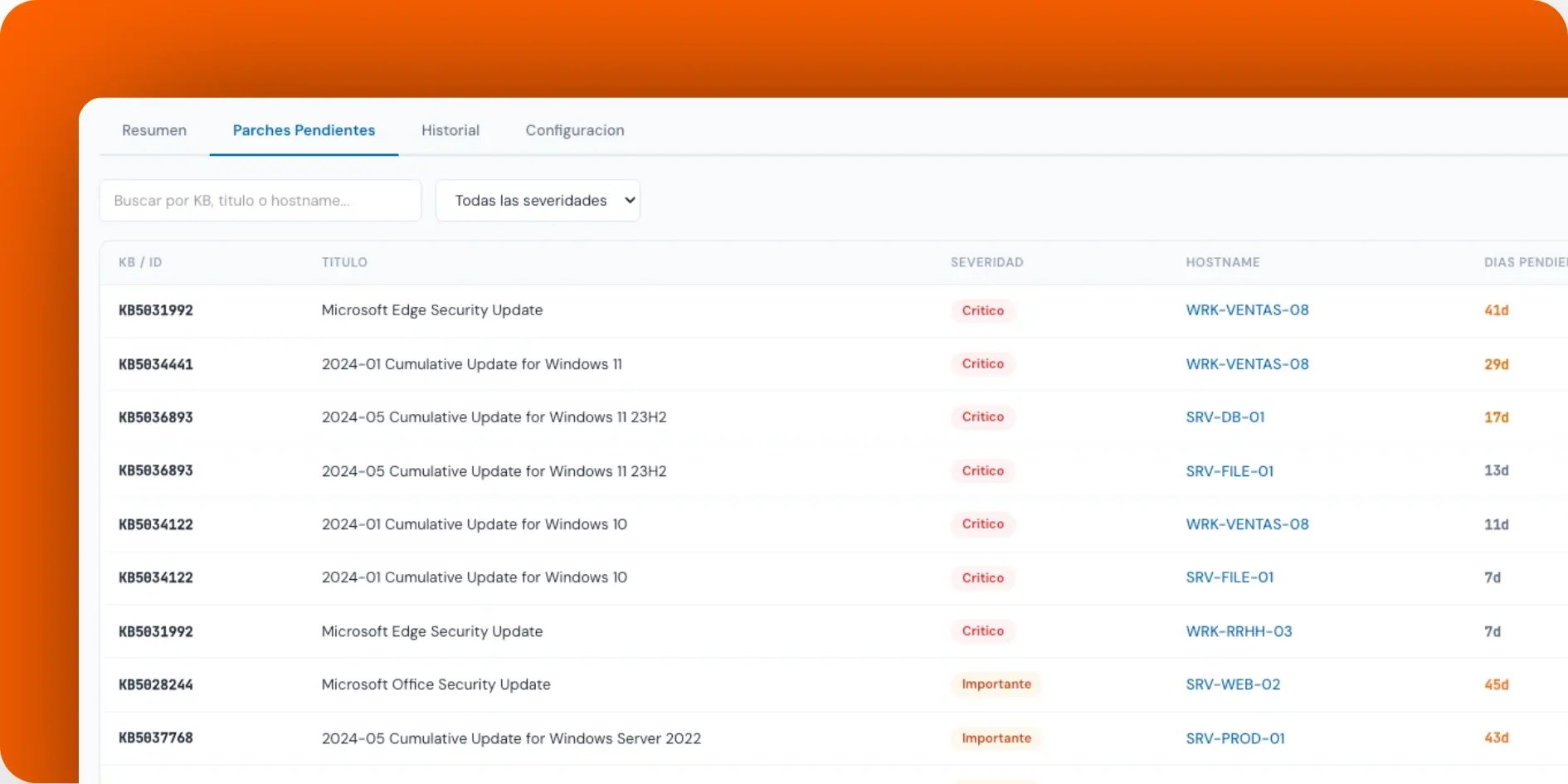
This view is the work list an IT team reviews every day. Each row shows the bulletin identifier (KB, Microsoft's Knowledge Base number), the update title, its severity, the affected hostname, how many days it has been pending and its original release date, with search by KB, title or hostname and a severity filter.
The days-pending field is what makes the difference. A critical Windows patch that has been pending for 41 days is very different from one pending for 7. Both are unapplied, but the first has been outside its SLA much longer. This view exists precisely so that distinction doesn't get lost among dozens of accumulated updates.
3. History of what is already installed
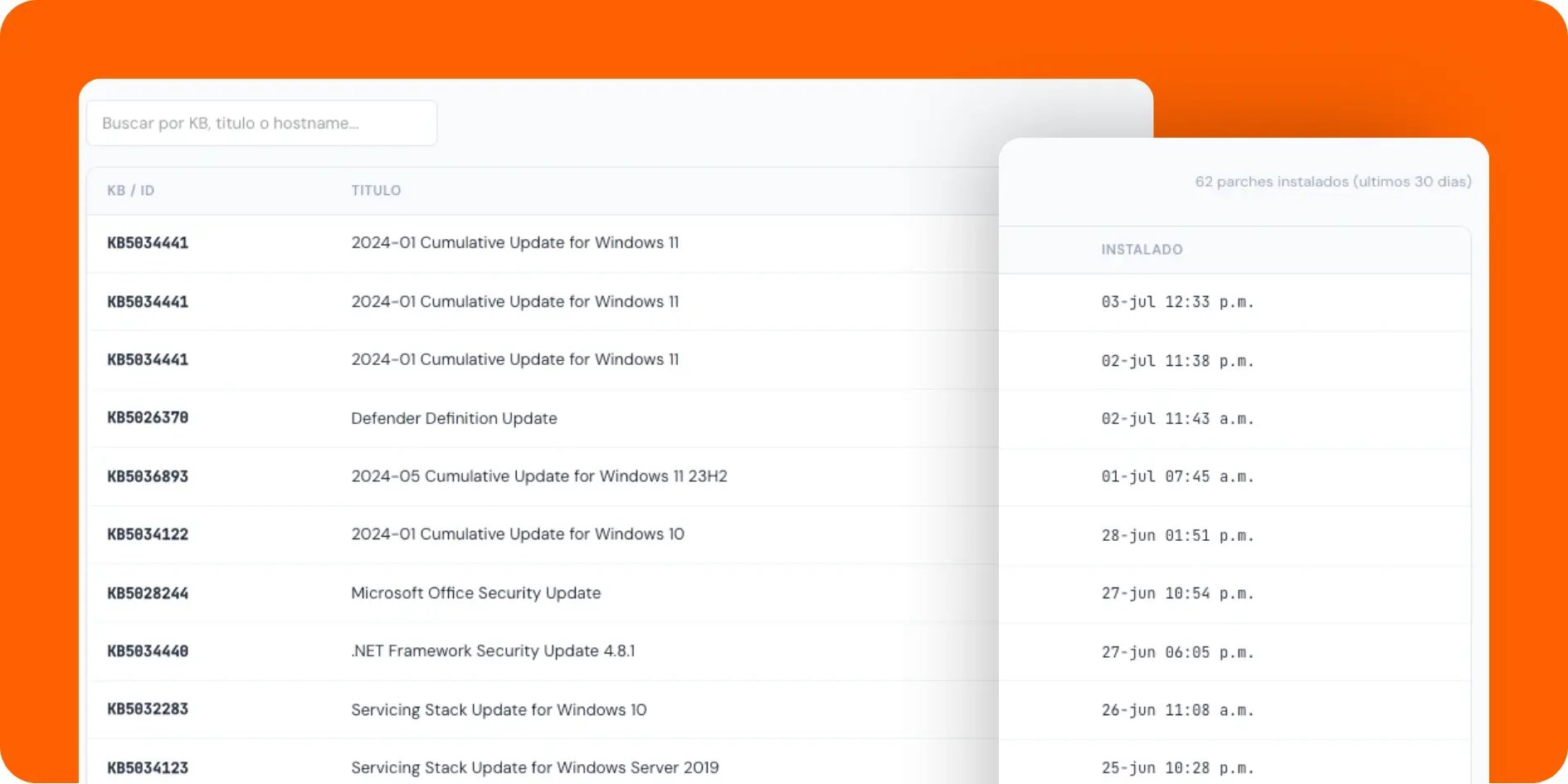
The module keeps a record of every patch applied in the last 30 days: KB, title, severity, hostname and the exact date and time of installation. It is the evidence that answers the question that comes up in any audit or posture review: was this really installed, when and on which machine? Having this history available without relying on a ticket or a lost email is what makes patching an auditable process you can prove.
4. Process rules, documented in writing
The configuration tab spells out how the full cycle operates, separate from the list of what still needs to be applied. The patching schedule follows a fixed maintenance window (the second and fourth Saturday of each month, from 10 PM to 2 AM local time), designed to stay out of productive hours.
For the patch to be applied in that window, the only requirement is that the computer is on and connected to the network during that time.
The remediation SLA is set by severity: 48 hours for critical vulnerabilities with a zero-day or active exploitation, 7 days for important ones with privilege escalation risk, 30 days for routine updates and 60 days for functionality, such as minor application updates and non-critical drivers (unlike version upgrades of the operating system itself or drivers for specific hardware, which are outside the service, as detailed below).
This scale follows the same logic the Vulnerabilities module already uses to prioritize remediation by CVSS (Common Vulnerability Scoring System): here it becomes a concrete deadline for applying the corresponding patch.
The tab also documents what the service covers (Windows security updates, monthly cumulative updates, .NET Framework, Microsoft Office and M365, browsers such as Edge and Chrome, and critical third-party software such as Adobe, Java and Zoom) and what it doesn't (Windows feature updates, firmware and BIOS, drivers for specific hardware, line-of-business software such as ERP or CRM, and restarts of production services without prior coordination). That line removes any ambiguity about what falls under the SLA and what requires a separate conversation.
5. A five-step process instead of an "apply all" button
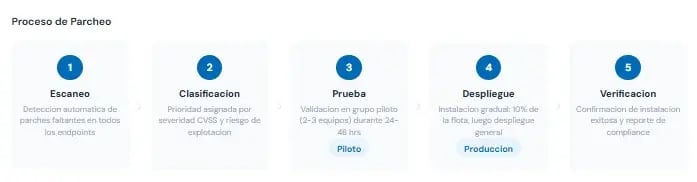
Every patch goes through scanning, classification, testing, deployment and verification. Approval is automatic for critical patches within 48 hours, important patches get a review by the TecnetSOC team within 7 days, and routine patches are validated on a pilot group first. Restarts happen during the maintenance window, except on critical servers, where they are coordinated directly with the customer.
How it fits with the rest of TecnetSOC
The Patching module doesn't work in isolation. The Vulnerabilities module identifies which CVEs (publicly catalogued vulnerabilities) affect each machine and at what severity; patching is the mechanism that closes that gap by applying the corresponding update within the SLA that same severity calls for.
And every device that appears in the patch table is the same asset that already has its full record in the Assets module: its protection posture, its owner history, its criticality rating. That is why clicking the hostname is more than a shortcut. It is the natural way to move between "what is this machine missing" and "what is this machine and how important is it".
The cost of not having a patching SLA
When there is no defined SLA, "we'll patch soon" means something different to each person on the team, and that ambiguity is exactly what an attacker takes advantage of. On "Exploit Wednesday", as the industry calls the day after Microsoft releases its monthly updates, attackers are already reverse engineering the patches to build exploits against anyone who hasn't applied them yet. Without a maximum remediation time by severity, that exposure window has no defined end.
With an SLA visible per device, the conversation shifts from "has it been patched?" to "how many days does this machine have left before it falls outside the critical SLA?". That turns patching from a reactive task into a measurable commitment, with a concrete deadline behind every pending patch.
Checklist: five questions about your patching process
- You know what percentage of your computers are current on security patches right now, without asking anyone to check.
- You can tell, with data, which critical patches have been pending the longest and which were just released.
- You have an SLA defined by severity, instead of "we'll apply it when we can".
- You can confirm which patch was installed, when and on which machine, without digging through an old ticket.
- You know what falls outside the patching service (firmware, drivers, feature updates) before it turns into a surprise.
This is the visibility TecnetSOC builds in natively, alongside vulnerability management, the asset inventory and the rest of its modules.
How to get started with the Patching module
If you are already a TecnetSOC customer, the Patching module is available in your portal: there you can check your current compliance, review which critical patches are still pending and confirm the history of what has been applied.
If you aren't a customer yet, here is a question worth asking: if someone asked you right now for your company's patch compliance percentage, could you give it as a number, or would it take days to put together by hand? If you don't like the answer, book a session with one of our specialists to review where your patching process actually stands today.

Levi is passionate about finance and technology, with a strong background in Financial Coordination. However, her true passion and curiosity have led her to explore the fascinating field of cybersecurity and Microsoft innovations. Combining her financial skills with a deep interest in data and systems protection, she has found in blogging a way to share her knowledge and help others understand the importance of staying secure in the digital world.