You can't protect what you don't know you have. That line sounds like a security cliché, but it is literally the problem the TecnetSOC Assets module solves: a centralized inventory of every device under monitoring (servers, workstations, firewalls, switches) with full visibility into its status, its coverage and who is responsible for it.
Most mid-size and large companies have their technology inventory spread across an outdated spreadsheet, the IT team's memory and whatever each tool reports on its own. The result is shadow IT: devices that exist, connect to the network and carry risk, yet nobody has documented or monitored them consistently.
The Assets module exists to close that gap, because it turns the question "what do we have and how is it protected?" into an answer you can verify inside the portal.
How does the TecnetSOC Assets module work?
1. Centralized inventory and real-time visibility
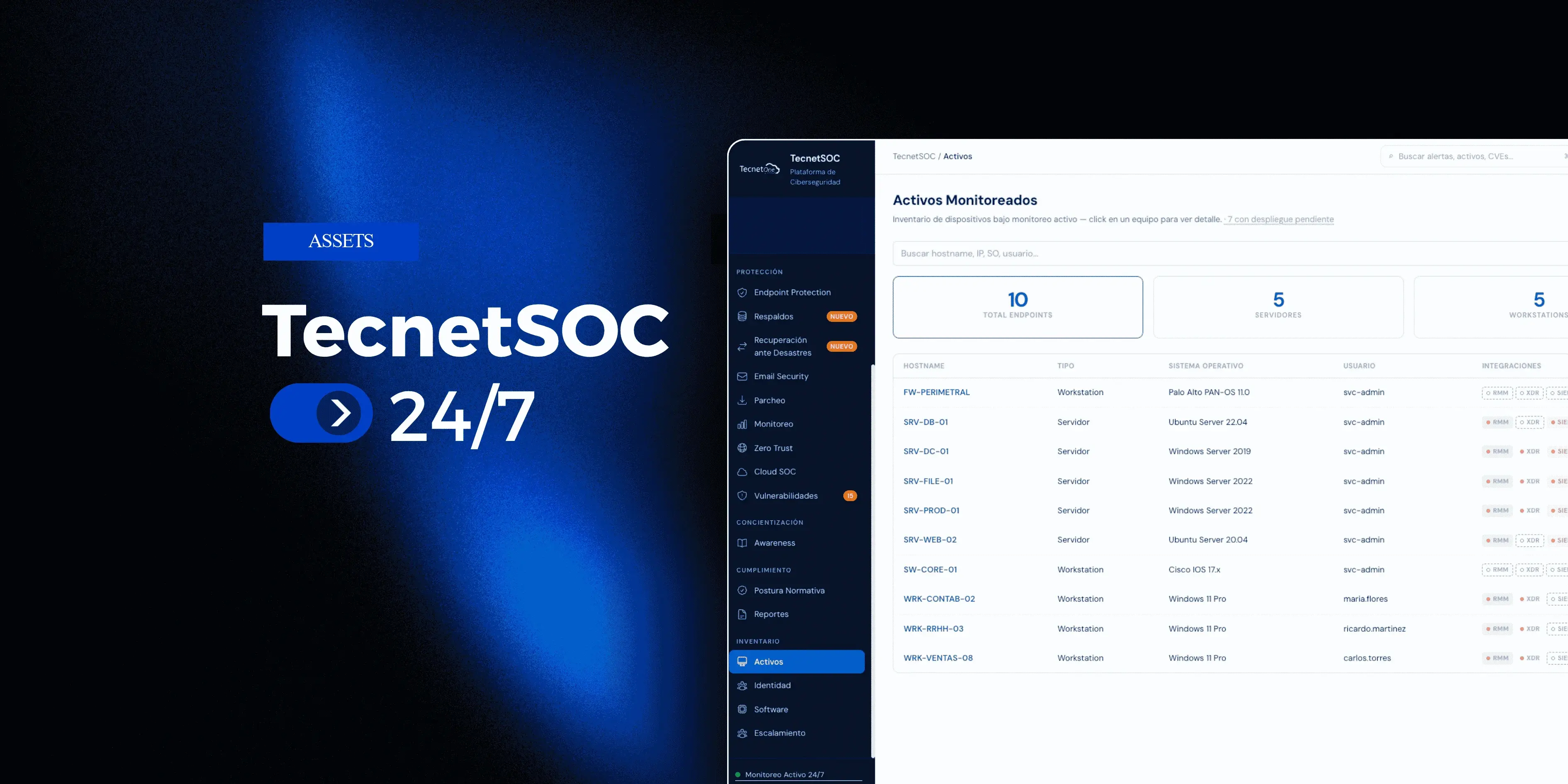
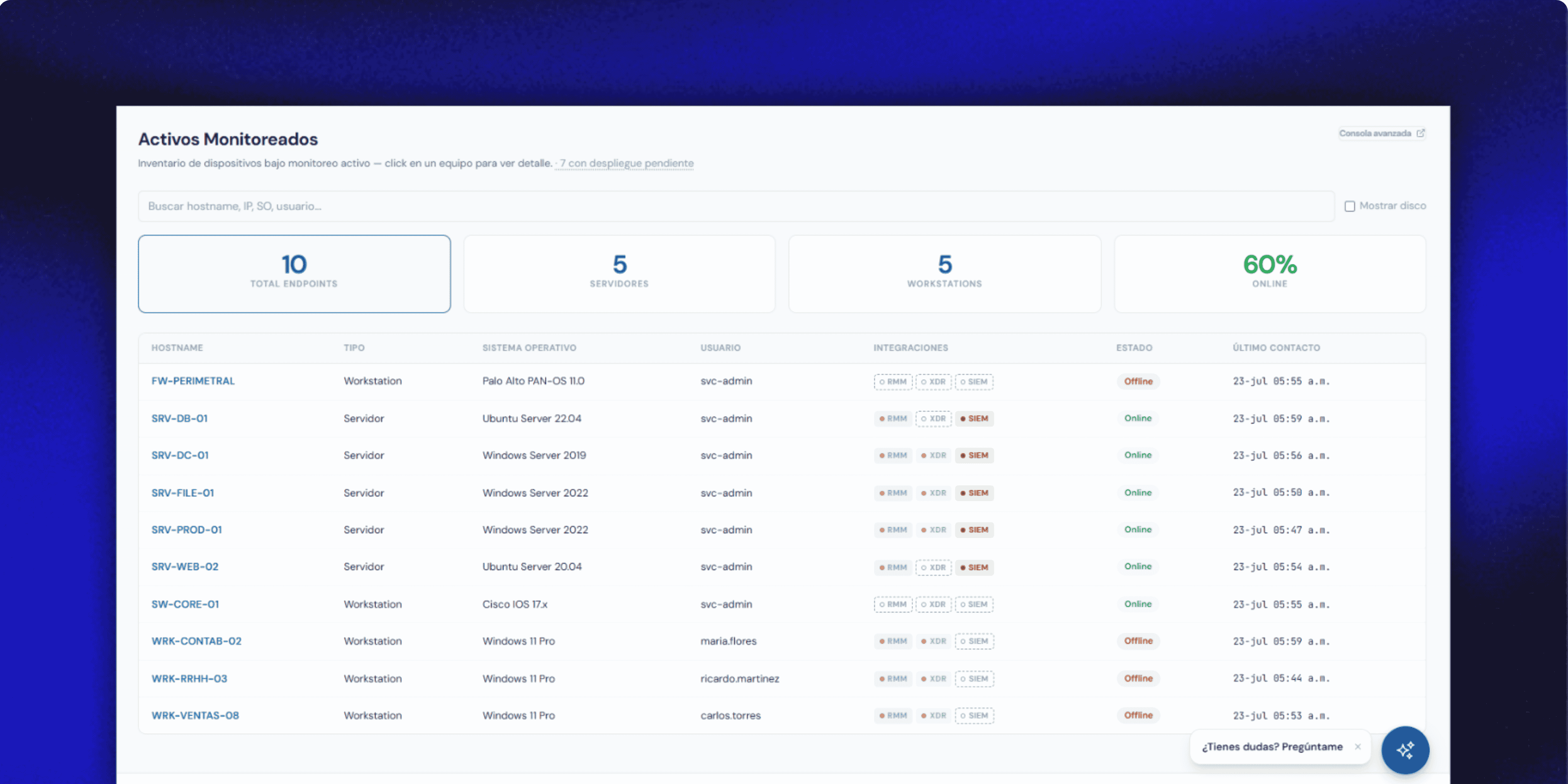
When you open the module, the portal immediately shows the full picture: total endpoints, how many are servers, how many are workstations and what percentage is online right now. Each inventory row includes the hostname, device type, operating system, assigned user and the exact timestamp of the last contact with the platform.
Search works in real time, filtering the table as you type, and the summary panels double as filters: clicking "Servers" or "Workstations" narrows the view instantly, with a button to clear filters when you no longer need them.
This answers a question every IT Director asks in the middle of an audit or an incident: of everything I manage, what exactly do I have and what state is it in right now?
2. Coverage by integration, with no blind spots
Having a device in the inventory is different from having it covered. Each device shows, through visual pills, which integrations are active (RMM for remote monitoring and management, XDR for extended detection and response, SIEM for security event management) and which are missing. The module header shows how many devices have a pending deployment, with a shortcut to filter just those cases.
This view turns shadow IT into a problem with a concrete fix: instead of discovering that a computer had gone months without a protection agent only after an incident, the coverage gap is visible right from the general inventory.
Each source (RMM agent, antivirus, monitoring) appears in color when it is actively reporting and is dimmed with a red dot when it hasn't sent data for a while. Status is checked every five minutes, so online or offline status doesn't depend on a cycle of several hours.
3. A rich detail record for each device
When you click any device, the detail record brings together on a single screen practically all the information the integrations collect from that machine.
The header shows status and last contact, followed by the protection posture in plain language: a "Hardened endpoint" or "Incomplete posture" badge with the list of reasons behind that rating, plus pills by category (antivirus, firewall, anti-exploit, encryption and others depending on the operating system).
Below that are health indicators with traffic-light colors (uptime, CPU, RAM and disk) with ok, warning and critical thresholds, along with physical details such as the BIOS version, the status of the device's security chip and a breakdown by disk partition.
Only the data the platform actually has is shown, without filling fields with dashes when information is missing, which keeps the record honest about what is known and what isn't.
4. Owner traceability and audit trail
Every asset has an owner band with the avatar of the person it is assigned to today, how long they have had it and a preview of the last two assignments, with an additional panel to view the full history. Changing the owner from the portal requires entering a reason, and that change is logged with who made it and when, without exception.
On top of that, there is an activity timeline written in natural language instead of internal codes, such as "Microsoft Word updated to v16.108.3", "patch scan: 4 approved, 2 manual" or "network adapter added", grouped by today, yesterday or a specific date.
That history is stored on the TecnetSOC side, so it doesn't depend on the 30 to 90 day retention window that source vendors usually keep. For audit processes such as ISO 27001, this chain of owner changes and activity is exactly the kind of evidence a security operations center produces to show control over the lifecycle of every device.
5. Editable administrative data that sync can't overwrite
The Acquisition tab lets you edit eleven administrative fields directly from the record: asset tag, location, purchase date, warranty dates, vendor, purchase order, information classification, criticality, notes and assigned user.
Whatever the customer enters there becomes the source of truth, and the next sync with the source agent no longer overwrites it (the only exception is the applied policy, which stays read-only because it comes directly from the RMM agent).
One detail that matters for managing devices for compliance purposes: the classification and criticality of new assets start as "Unassigned" instead of a default value such as "High" with no justification, something that used to create inconsistencies in inventory audits.
Classifying each device (public, internal, confidential) and giving it a real criticality level is a deliberate step inside the portal, not a box that fills itself in.
How it fits with the rest of TecnetSOC
The Assets module is the foundation the rest of the ecosystem builds on. The protection posture shown here comes directly from the Endpoint Protection module, while health and availability status are fed by the 24/7 Monitoring module.
When an anomaly on an asset needs review, it can be escalated to the Incidents module or, if the case calls for deeper analysis, to the Investigations module. The TecnetSOC recommendation engine uses these same inventory and coverage signals to prioritize what to address first.
Without a centralized, reliable inventory, each of those modules works with incomplete information. The Assets module ensures that, before anyone talks about detection or response, there is complete clarity about what is being protected.
How to get started with the Assets module
If you are already a TecnetSOC customer, the Assets module is available in your portal: there you can view your full inventory, spot coverage gaps between integrations and classify the criticality of each device, with a complete audit trail of every change.
If you aren't a customer yet, here is a question worth asking: if someone asked you right now for an exact inventory of all your devices with their protection level, could you deliver it in minutes, or would it take days to put together by hand? If you don't like the answer, book 30 minutes with a TecnetOne specialist to review where your inventory actually stands today.

I'm passionate about SEO and copywriting at TecnetOne, where I combine my technical knowledge with optimization skills and persuasive writing. I use advanced tools and techniques to boost companies' online visibility, making sure they stay at the forefront of technology and achieve outstanding results in a competitive digital landscape. My goal is to build effective strategies that drive our clients' technological and commercial success.